
On this page
Before you start
Nothing in the app switches chains. You pick a coin, and the app routes the trade to that coin's chain. Check four things first:
- USDC, plus a little SOL. When Pump.fun opened Ethereum, Base and BNB Chain on May 26, 2026, you paid with SOL. USDC trading followed on July 30, and the announcements for every chain added since say you buy "straight from your USDC balance". Hold USDC for EVM coins and keep some SOL for withdrawals.
- No ETH or BNB. You never need the chain's own gas token. Pump.fun pays the network gas out of its EVM fee.
- An EVM wallet. Accounts made with an email or social login get one automatically. If you imported a Solana private key, open Settings, then View wallets, and tap Create EVM wallet. Without it, EVM buys fail with "Failed to generate quote for transaction".
- A referral code. The platform fee applies on every chain, and any valid code, such as BonusReward, cuts it from 0.45% to 0.40%. It goes in under Profile, Rewards, Referrals before your first purchase.
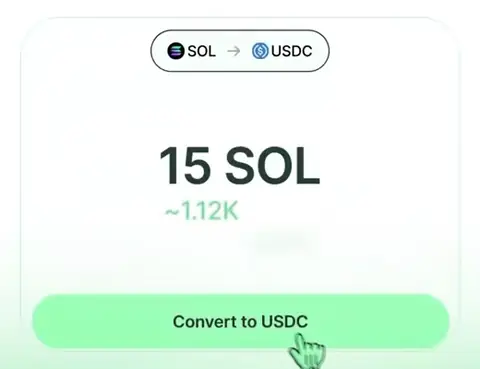
Only holding SOL? Convert some to USDC inside the app first. The swap takes SOL in and gives you USDC at the current price.
Which chains can you trade?
Solana plus at least 13 EVM chains, with new ones added every few days in late 2026. Ethereum, Base and BNB Chain arrived on May 26, 2026. Robinhood Chain followed in July and HyperEVM on August 26. Arc and Ink were live by October 22. Then came Monad, MegaETH, X Layer, Arbitrum and Polygon in the last week of October, and Avalanche on November 4. TON and NEAR, which are not EVM chains, joined on October 27 and November 3.
Pump.fun co-founder Alon Cohen put the reason plainly on November 3, 2026: "Being ready and using the same balance you have on the app is a lot faster than needing to bridge over manually when you spot something."
Step 1: Read the chain badge on a coin
Every coin's logo carries a small badge in the corner, and that badge is the chain. A green two-lobed mark is HyperEVM, a blue square is Base, a yellow diamond is BNB Chain, and the purple-and-blue diamond is Ethereum. Solana coins carry the striped Solana mark.
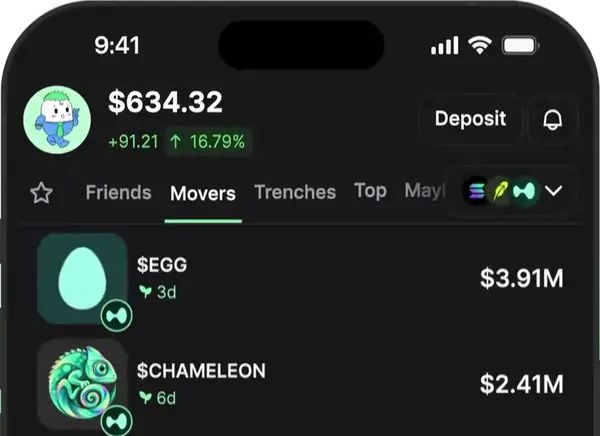
The icons to the right of the feed tabs show which chains the feed includes. Tap them, or the arrow beside them, to change the selection.
Step 2: Filter for one chain or search by address
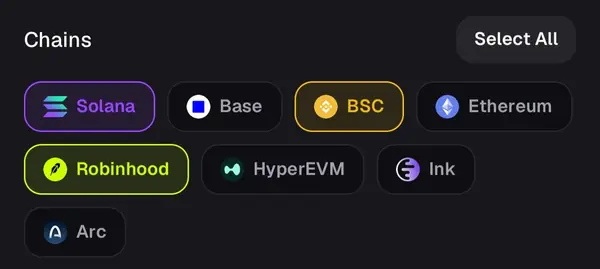
To see only Base coins, or only BNB Chain coins, open the filter and use the Chains buttons. Tap a chain to add or remove it. Select All brings every chain back. The same filter has a Launchpads section, so you can narrow it down to one launchpad too.
When someone sends you a coin, search by its contract address, not by name. EVM addresses start with 0x. The addresses of coins launched on Pump.fun's Solana side usually end in "pump". The same ticker often exists on Base, BNB Chain and Solana at once, and they are different coins with different holders.
Step 3: Buy it from your balance
Open the coin, tap the green buy button and enter an amount, the same way as in how to buy coins on Pump Fun. The keypad spends your USDC or SOL. Before you tap Submit, read the cost lines, because an EVM trade carries one more fee than a Solana one:
| On a $100 EVM buy | Cost |
|---|---|
| Platform fee | $0.45, or $0.40 with code BonusReward |
| EVM fee | $0.10 to $0.15 |
| Network gas | $0, paid by Pump.fun from the EVM fee |
| Pool fee and any token tax | Set by the coin's pool and contract, inside the price |
Pump.fun's fees page puts the EVM fee at 0.10% to 0.15% of each transaction and says the amounts show before you confirm. Pump Bridge, Pump.fun's own cross-chain route since October 21, 2026, adds no bridging fee for now. Pump.fun measured its typical cross-chain buy at 1.95 seconds, with fewer than 1 in 100 buys hitting an error.
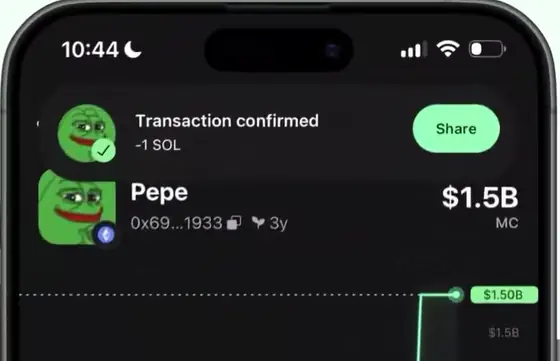
Buy a small amount first on a chain you have not traded before, then sell a few dollars of it straight back. EVM contracts can block sells or tax them, which a Pump.fun Solana coin cannot do. For a deeper look at those checks, see our Ethereum and Base trading guide.
Step 4: Find the coins afterwards
Open your profile and stay on the Open tab. Positions from every chain sit in one list, each with its chain badge, value and profit or loss. The Balance row above them is your USDC and SOL.
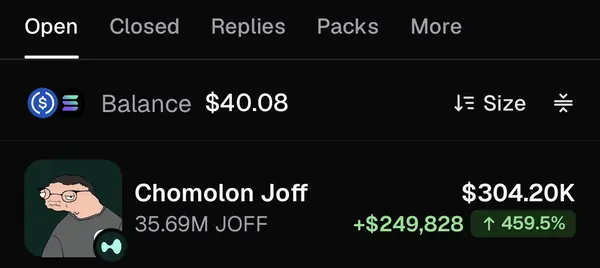
On chain, the coins belong to your account's EVM wallet. One 0x address serves every EVM chain, and View wallets shows it next to your Solana address. Set exits while you are there with take profit and stop loss orders. They reached Robinhood Chain, BNB Chain, Base, HyperEVM, Arc and Ink on October 22, 2026, and most chains added since came with them.
Step 5: Move back to Solana
Sell the coin. The sale pays out in USDC to your Balance row, the same balance your Solana trades use. There is no separate bridge step. A sell costs the same fees as a buy: the platform fee, the EVM fee and the pool fee.
From there, keep the USDC for the next trade, convert it to SOL, or withdraw it. The withdraw form is built for Solana addresses. To take money off an EVM chain, sell in the app first, then withdraw the USDC or SOL.
If it does not work
- "Failed to generate quote for transaction". Your account has no EVM wallet. Go to Settings, View wallets, Create EVM wallet, then try again.
- The buy is greyed out or fails on amount. Check that you hold enough USDC. Convert some SOL, or lower the amount.
- The trade says it is still processing. A cross-chain trade is still confirming. Wait a minute and check the Open tab before you tap again, or you may buy twice.
- You cannot sell. The token's contract may block or tax sells. Try a smaller amount. If nothing sells, no app setting can fix a honeypot.
- A chain you expected is missing. Update the app and check the feed's chain picker. New chains arrive in app updates.
