On this page
Before you start
The Pumpfun app sends SOL, USDC or any coin you hold to another wallet. It does not pay out to a bank or card, so cash always goes through an exchange account in your name. Sort these out before you open the form:
- The destination address. Your exchange's Solana deposit address, or a wallet such as Phantom. Copy it from the destination itself, not from a chat or an old note.
- 0.005 SOL on top of the amount. Pump.fun asks for 0.005 SOL with every withdrawal. To send 1 SOL you need 1.005 SOL in the wallet. That holds even when you are sending USDC or a coin.
- Your deposit match status. If you signed up with code BonusReward in the last 10 days and are still working toward the $50 deposit match, wait. Pump.fun co-founder Alon Cohen wrote on October 17, 2026 that both sides keep the part earned on the days the new user traded, "as long as the deposit stays in the app." Pull the deposit out early and the rest can lapse.
Your Pump wallet is a Privy wallet tied to your login, so you withdraw from inside the app or pump.fun. There is no separate Privy screen to visit.
Step 1: Sell the coins you want to cash out
Withdraw sends whatever sits in the wallet, so if you want money rather than tokens, sell first. Open the coin and tap the red minus button next to its ticker. The sell sheet shows Holding with its dollar value, four shortcuts (25%, 50%, 75%, Max) and a fee line. Tap Max to sell everything, then Submit.
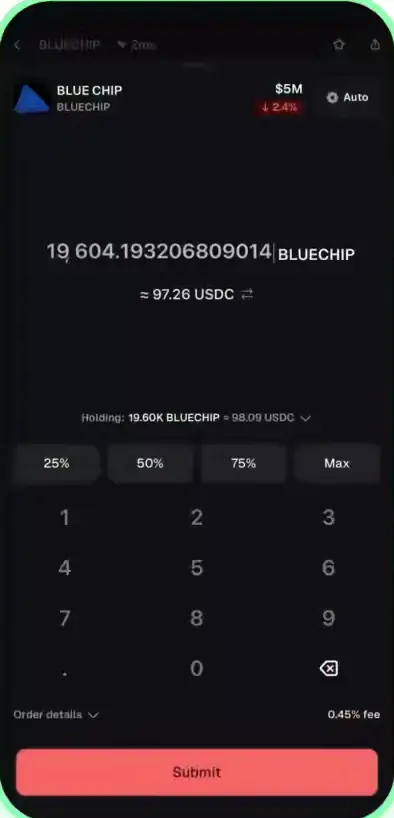
Read that fee line. Every sale in the app pays a 0.45% platform fee, or 0.40% if your wallet joined with code BonusReward. On top comes the coin's pool fee: 1.25% on the bonding curve, then 1.25% down to 0.30% on PumpSwap as the market cap grows. Selling $100 of a bonding-curve coin costs about $1.70 in total. Coins on EVM chains such as Base add another 0.10% to 0.15%.
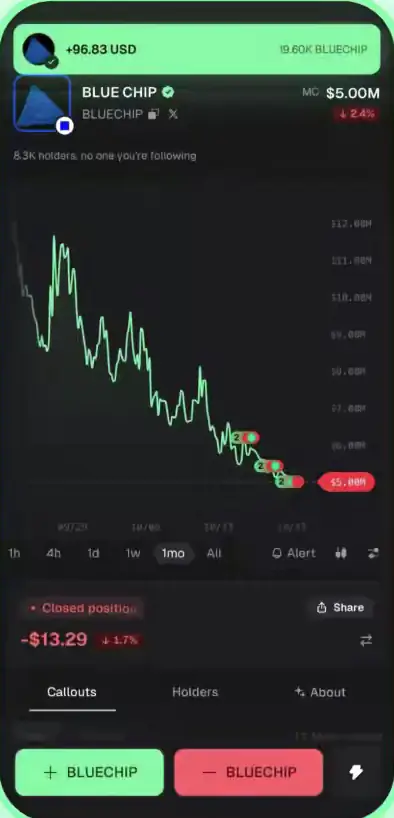
When the sale lands, a green banner at the top shows what reached your balance, and the position switches to Closed position. The money arrives as SOL or USDC, depending on what the coin trades against.
Step 2: Copy the address you are sending to
Take the address from whatever will receive the money. On an exchange, open Deposit, choose SOL or USDC, set the network to Solana, then copy. In Phantom or another Solana wallet, tap Receive and copy the Solana address.
Two checks matter more than anything else here. First, the network. A Solana address is 32 to 44 letters and numbers and never starts with 0x. USDC lives on many chains, and an exchange left on its default network will show you an Ethereum address for it. Second, the memo. As Pump.fun documents it, the withdraw form asks only for an address and an amount. If your exchange shows a memo or tag for Solana deposits, do not send to that address from the app.
Never paste a contract address. A coin's contract address looks just like a wallet address. Pump.fun warns that anything sent to a contract address cannot be recovered.
Step 3: Open Withdraw in the app
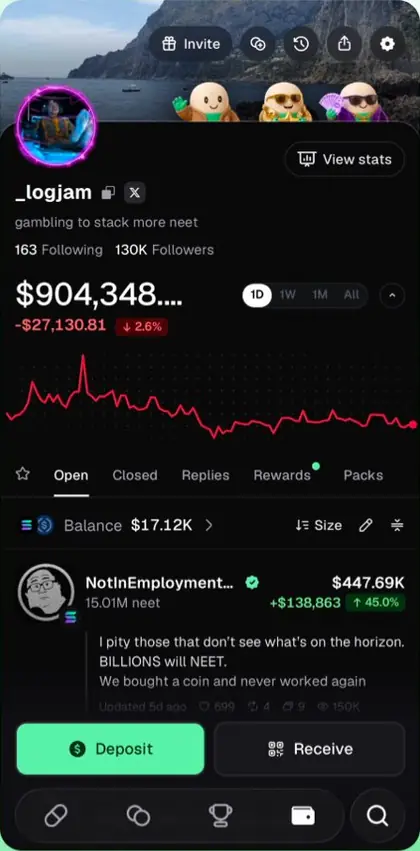
Tap the wallet icon in the bottom bar to open your profile. Balance sits under the chart, with Deposit and Receive at the bottom. Withdraw is not on this screen. Tap the gear icon at the top right, then Withdraw.
If you trade on pump.fun in a browser, sign in with the same email or social login you use in the app. Same wallet, same balance.
Step 4: Pick the coin, paste the address, set the amount
The form asks for three things in order: the coin, the destination address and the amount. Choose SOL, USDC or the coin, paste the address, then type the amount.
- Leave the 0.005 SOL. When you send SOL, take 0.005 off your full balance. Sending 2 SOL from a 2 SOL balance fails.
- Compare the first and last four characters of the pasted address with the original. Clipboard malware swaps addresses, and checking both ends catches it.
- Send a small test first to any address you have not used before. It costs one extra network fee, which on Solana is a fraction of a cent.
Pump.fun lists no minimum withdrawal, but two limits come from elsewhere. Exchanges set a minimum deposit, often a few dollars, and may never credit anything smaller. And sending a coin to a wallet that has never held it opens a token account there, which carries a small SOL deposit of about 0.0015 SOL at the time of writing.
Step 5: Tap Send and check that it landed
Tap Send. There is no cancel button. Once submitted, a withdrawal cannot be reversed by you or by Pump.fun. Solana settles in seconds, so a wallet like Phantom shows the funds almost at once. Exchanges credit deposits after their own checks, which usually takes a few minutes.
To see it for yourself, paste the destination address into any Solana block explorer. The transfer appears in that address's history within seconds of confirming, whatever the exchange screen says.
Can you cash out to a bank account or card?
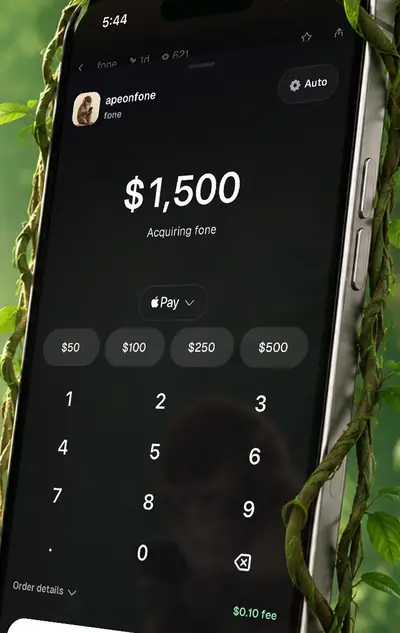
No, not from the app itself. Apple Pay and card work in one direction only, for buying crypto into the wallet, and Pump.fun documents no sell-to-bank option at the time of writing. To turn a balance into cash:
- Sell your coins in the app for USDC or SOL (step 1).
- Withdraw to your exchange's Solana deposit address (steps 2 to 5).
- On the exchange, sell for your currency and withdraw to your bank. The exchange charges its own trading and payout fees and will ask for identity checks.
USDC is the cleaner route if your exchange accepts USDC on Solana. It holds its dollar value while it moves, so the price cannot drift between the app and the bank.
What does a withdrawal cost?
The withdrawal itself costs almost nothing. The selling before it is where the fees are.
| Item | Cost |
|---|---|
| Pump.fun withdrawal fee | None listed |
| SOL to keep in the wallet | 0.005 SOL per withdrawal |
| Selling a coin first | 0.45% platform fee (0.40% with code BonusReward), plus the pool fee of 0.30% to 1.25% |
| Coins on EVM chains | Another 0.10% to 0.15%; Pump.fun pays the gas from it |
| Sending a coin to a new holder | About 0.0015 SOL token account deposit |
| Exchange | Its own trading fee and bank payout fee |
If you have not added a referral code yet, it has to go in through the mobile app before your first purchase. Code BonusReward is the one on this site, and any valid code gives the same 0.40% rate.
If it does not arrive
Work down the list in order. The first check takes seconds and tells you which side the problem is on.
- Look up the destination address on a Solana explorer. If the transfer is listed, the funds left Pump.fun and reached that address. Anything else is on the receiving side.
- Give the exchange an hour, then open a ticket. Send its support the address and the time of the transfer. A deposit that arrived without a required memo can often be credited by hand, but only through support.
- Check the network. If the address you used belongs to another chain, only the exchange can say whether it can recover the funds.
- Send failed or stayed grey. This is almost always the SOL buffer. Top up so you hold 0.005 SOL more than you are sending, then try again. A failed withdrawal moves nothing.
- Wrong address or a contract address. Nobody can reverse a confirmed Solana transfer. If you control the receiving wallet, the funds are there. If you do not, they are gone.
- Still stuck? Use Support in the app, or on pump.fun through your profile card. Pump.fun staff never ask for your private key, recovery phrase or login codes, so anyone in your messages who does is running a scam.