On this page
Pump.fun is a crypto trading app built around memecoins and the people who trade them. You buy and sell coins on Solana and a dozen other chains from one wallet, follow traders whose calls you like, and get a push alert when they post a new one.
Before you start
You need the app, a referral code and $20 to $50. Install the Pumpfun app from the App Store or Google Play, sign in, and add the code before you buy anything. A code drops the platform fee on every trade from 0.45% to 0.40%, and it only counts if it is in place before your first purchase. The download guide shows how to spot the real listing, and the four referral steps take about a minute.
That $20 to $50 is enough to learn every screen below. On a coin still on its bonding curve, a buy costs about 1.65% in listed fees with code BonusReward (1.70% without), and so does the sell. A $20 round trip costs roughly $0.65 before network fees. Treat that as the price of the lesson, and only use money you could lose in full.
Step 1: Learn the five icons at the bottom
The app opens on the home feed. Five icons run along the bottom. The pill brings you back to this feed, the trophy opens the leaderboard, and the magnifier is search. The other two hold the coin lists, with Coins, Stocks and Perps tabs, and your wallet. Icons shift between updates, so learn them by shape.
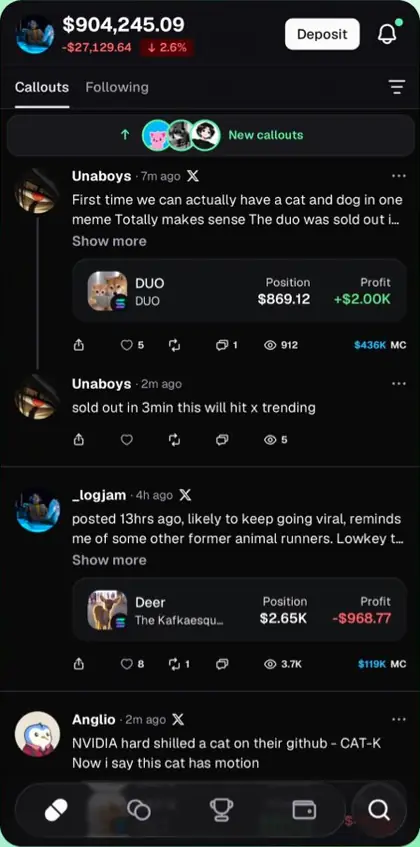
The feed is made of callouts. A callout is a post in which a trader names a coin they hold, with their position size and profit shown under it. Callouts shows everyone, Following shows only the people you follow. Your balance sits at the top left, with Deposit and the bell for notifications at the top right.
The usual mistake is treating the feed as advice. A callout comes from someone who already holds the coin, and they gain when you buy after them.
Step 2: Find a coin
Tap the magnifier and type a coin name, a ticker or a contract address. Results come in four tabs: All, Coins, Users and Squads, so the same search also finds traders and teams.
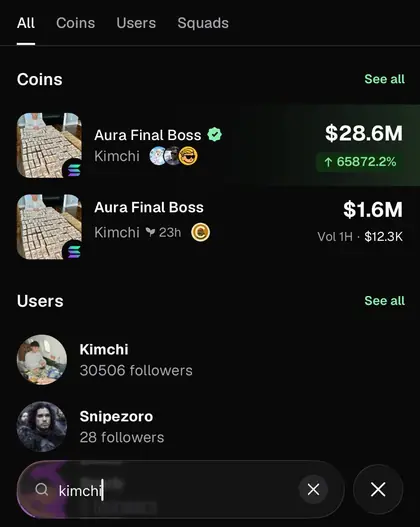
Names are not unique. Anyone can launch a coin with the same name as a popular one, and the copy can show up first. If someone sends you a coin, ask for the contract address and paste that. A coin launched a few seconds ago can be missing from search until its first buy goes through.
Step 3: Read the coin page before you buy
Tap a result to open its coin page. The top shows the price and the day's change, the number of holders and which of the people you follow hold it too. The star saves the coin to your watchlist. If the coin has a perps market, a Perp button switches to it; perps use leverage and are a different risk.
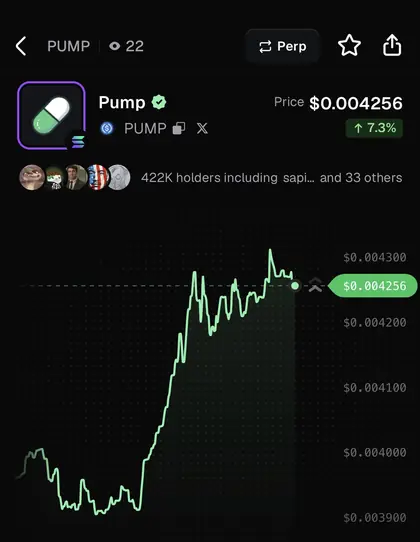
Under the chart you pick the time frame and set a price alert with Alert. Before your first buy, check three things: how old the coin is, how many holders it has, and its market cap. A coin that is ten minutes old with a few hundred holders can lose most of its value in one sell.
Step 4: Buy a small amount
The green button on the coin page buys; the red one sells.
- Tap the green buy button. A keypad opens with your available balance.
- Type an amount, or tap 25%, 50%, 75% or Max of your balance. For a first trade, type $5 to $10 by hand.
- Leave the Auto settings as they are. They handle slippage, and a first trade gives you no reason to touch them.
- Read the fee line. It should say 0.40%. If it says 0.45%, no code is attached to your wallet.
- Tap Submit. A green banner confirms the buy, with an option to add a callout.
The coin now shows under Open on your profile. Coins on Base, BNB Chain and the other EVM chains cost an extra 0.10% to 0.15% per trade, and Pump.fun pays the network gas from it. The fee breakdown has the full numbers.
Step 5: Sell it
Open the same coin page and tap the red sell button. Pick 25%, 50%, 75% or Max, check the fee line, and tap Submit. The money lands back in your balance a few seconds later.
Sells pay the same fee rate as buys. Practice on a coin with real volume, because a sell can fail when almost nobody is trading. And you do not have to stare at the chart all day: limit orders with take profit and stop loss can sell for you. They came to Solana coins on September 1, 2026 and to EVM chains on October 22, 2026.
Step 6: Follow traders and turn on alerts
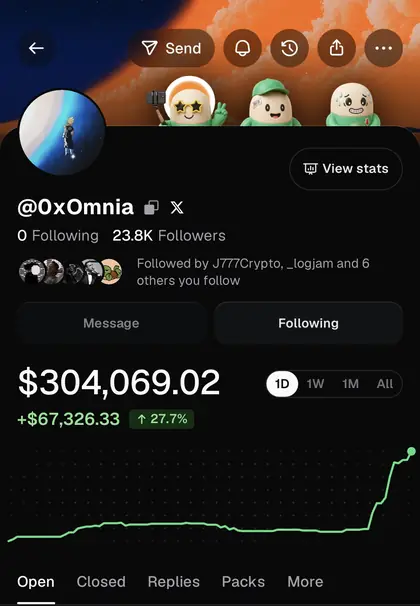
Tap a trader's name to open their profile. It works from the feed, the leaderboard or search. Tap Follow; the button changes to Following. The bell at the top then sets which of their posts reach your lock screen, such as new callouts, updates, replies and reposts, with a market cap filter. View stats shows how their calls have done.
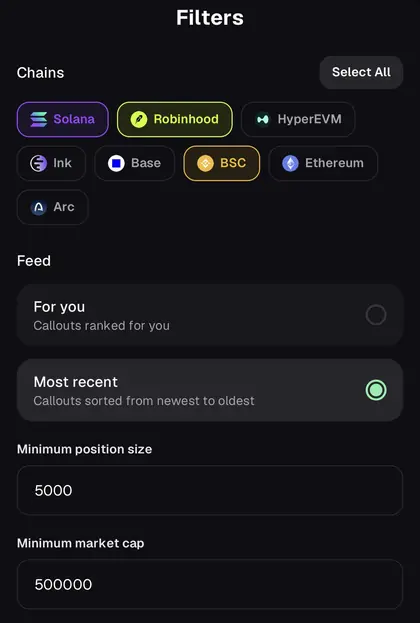
Back on the feed, the filter icon trims the noise. Choose chains, switch between For you and Most recent, and set a minimum position size and market cap. A minimum position of $5,000 hides small bets.
An alert never buys for you. No Pump.fun product copies trades automatically, and our copy trading page explains what comes closest. By the time the alert arrives, the caller is already in.
Step 7: Find your rewards
Open your profile and tap the Rewards tab. It lists Callout rewards, Referrals, Achievements, Cashback and Creator rewards, with a Claim button at the bottom for anything waiting.
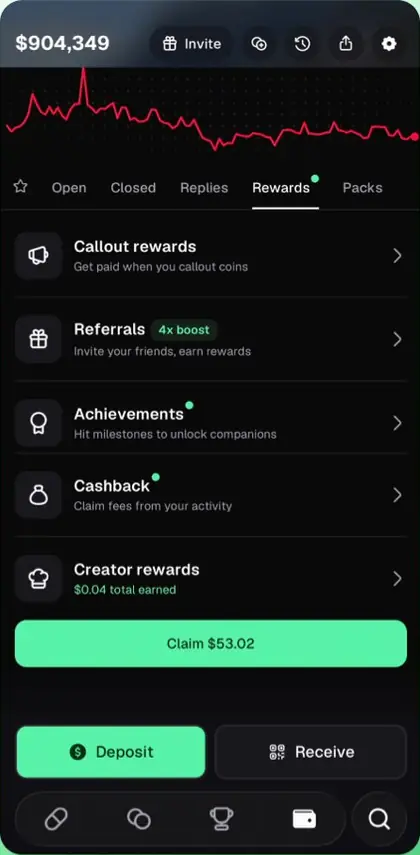
Callout Rewards pay daily, based on the trading your calls bring to a coin. Referrals pay you a share of the platform fees of people who sign up with your username as their code. Holder Rewards are paid by coins that switch them on, straight to the wallets that hold them. None of these is guaranteed, and Pump.fun changes the rates often.
The ten-minute checklist
- Install the real app and add code BonusReward before any purchase.
- Deposit $20 to $50 and no more.
- Find a coin by its contract address, not by its name.
- Check its age, holders and market cap on the coin page.
- Buy $5 to $10, and confirm the fee line says 0.40%.
- Sell it with Max and watch the money come back.
- Follow two or three traders and set their alerts with the bell.
- Look at the Rewards tab once, so you know where to claim.