
On this page
Before you start
Most people fund the app by sending SOL from an exchange account. It is the cheapest route, and the steps below follow it. Sort out three things before you open the deposit screen:
- The login you will keep. Each email or social login has its own wallet. Sign in with a different email and your deposit lands in a different, empty wallet.
- A referral code, before your first buy. Enter it under Profile, Rewards, Referrals. Any valid code cuts the platform fee from 0.45% to 0.40% on every trade. Ours is BonusReward.
- Some SOL, even if you trade in USDC. The app trades with SOL or USDC. Every withdrawal needs 0.005 SOL left in the wallet, so send a little SOL along with any USDC.
After the deposit match? Crypto sent from an exchange or another wallet never counts toward it. Only your first purchase with a card, Apple Pay or Google Pay inside the app does, and only if a referral code was applied first. Buying with a card covers that route. The deposit match rules list every condition.
Step 1: Tap Deposit
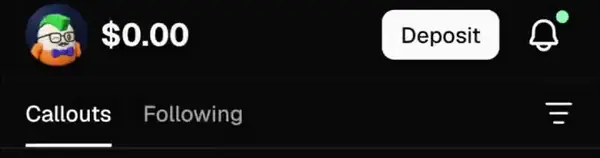
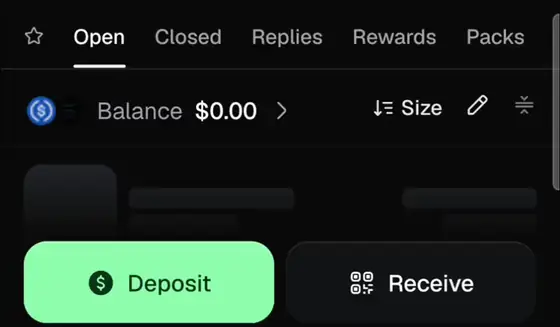
Tap Deposit at the top right of the home screen, next to the bell. Your profile has the same button at the bottom, beside Receive.
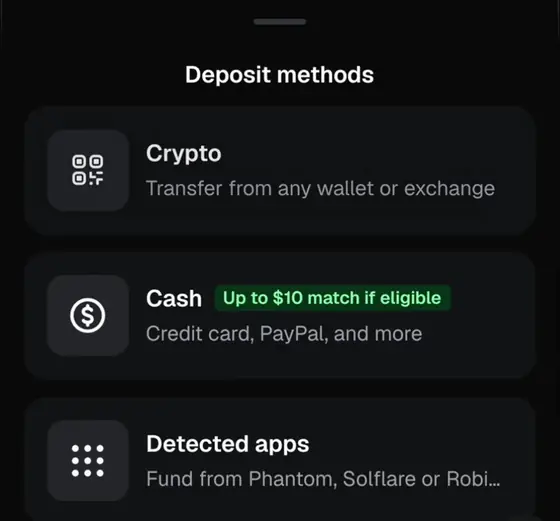
A sheet called Deposit methods opens with three choices:
- Crypto, "Transfer from any wallet or exchange". This is the route for SOL and USDC.
- Cash, "Credit card, PayPal, and more". This buys crypto with a card or a phone wallet, and its badge shows the match offer for your account.
- Detected apps, which funds the app straight from Phantom, Solflare or Robinhood when one of them is installed. On an iPhone the sheet may name the app instead, for example Phantom. The Phantom guide covers that route.
Step 2: Choose Crypto and copy your Solana address
Tap Crypto. The address it shows first is your Solana wallet address. It takes SOL and USDC on Solana. Copy it with the copy button, never by retyping it.
There is a shortcut: on your profile, tap Receive. It opens the same address.
Look at what you copied. A Solana address has 32 to 44 letters and numbers and never starts with 0x. An address that starts with 0x belongs to an EVM network such as Ethereum or Base, and a SOL transfer sent to it will not arrive.
On pump.fun in a browser, click your balance next to your avatar, choose Deposit and click copy deposit address. Sign in with the same login as on your phone and you get the same wallet.
Step 3: Send SOL from your exchange or wallet
On the exchange, open Withdraw, pick SOL and set the network to Solana. Paste the address, enter the amount and confirm. In Phantom or another Solana wallet, tap Send, pick SOL, paste the address and confirm.
- Network: Solana, every time. Exchanges list SOL and USDC on several networks. For USDC, pick USDC on Solana, not on Ethereum or BNB Chain.
- Memo: leave it empty. Your Pump wallet is a plain wallet and needs no memo or tag.
- Check both ends of the address. Compare the first and last four characters after you paste. Clipboard malware swaps addresses, and this catches it.
- Send a small test first to an address you have not used before. On Solana the extra transfer costs a fraction of a cent.
The exchange charges its own withdrawal fee, usually a small fixed amount of SOL, and sets a minimum withdrawal. Both show on its withdraw screen before you confirm, so read them there.
Buying SOL first? If your exchange balance is in dollars or euros, buy SOL on the exchange and withdraw it. That is usually cheaper than buying with a card in the app. The app's Cash route charges the payment partner's fee, while an exchange charges its trading fee and a flat withdrawal fee.
Step 4: Deposit a token from another network
Use this route when your money sits on another network, such as USDT on Ethereum or USDC on Base. Tap Crypto, then choose the option for another network. Pick the token you are sending, for example USDC, ETH or USDT, then the network it is on. The app shows a deposit address for that token on that network.
Read the minimum before you send. This route shows a minimum amount on the screen. Pump.fun says anything below it is not processed and not refunded. Send more than the minimum after the sending side's fee.
Match the token and the network exactly to the screen. An address shown for USDT on Ethereum is not an address for USDT on BNB Chain, even when the two look identical. Funds sent on the wrong network may be lost for good.
If you can, convert to SOL or USDC on Solana before you send. It is usually cheaper and quicker than a cross-network deposit.
Step 5: Check that it arrived
A SOL transfer confirms on Solana within seconds, and the app's balance follows soon after. When a deposit feels slow, the delay is almost always on the sending side. Exchanges run their own checks first. That usually takes a few minutes and can take longer for a first withdrawal to a new address. Deposits from another network take longer than SOL because they cross chains before they land.
Once the money arrives, the total at the top of the home screen and the Balance row on your profile show it in dollars. You can buy straight away, and how to buy coins on Pump Fun walks through that first trade.
Is there a minimum deposit?
No, not for SOL or USDC sent on Solana. The limits you meet come from the other routes and from the sender.
| Route | Minimum | Typical time |
|---|---|---|
| SOL or USDC on Solana | None set by Pump.fun. Your exchange sets a minimum withdrawal. | Seconds once sent |
| Token on another network | Shown on the deposit screen. Less is not processed or refunded. | Minutes |
| Cash (card, Apple Pay, Google Pay) | Shown on the screen, $22 for Google Pay in November 2026 | Once the payment clears |
Whatever you send, plan for the 0.005 SOL every withdrawal needs to leave behind.
If the deposit does not show
Work down the list in order. The first check tells you which side the problem is on.
- Look up your address on a Solana explorer. Paste your Pump wallet address into any Solana block explorer. If the transfer is listed, the money is in your wallet and the app has not caught up yet. Close the app and open it again.
- Check the login. A $0 balance you did not expect usually means a different login. Log out and sign in with the email or social account you used first.
- Check the exchange. If the explorer shows nothing, open the withdrawal in your exchange history. Pending means wait. Completed with a transaction ID means it went somewhere, so compare that address with yours, character by character.
- Look for hidden tokens. A token can arrive and stay out of sight. Open the Spam and hidden row under the list on your profile, and check the Show dust balances setting.
- Wrong network or below the minimum. If the funds went on a network the address was not for, or under the minimum shown, only the sending exchange or Pump.fun support can say whether anything is recoverable. Do not count on it.
- Still missing? Contact Pump Fun support in the app with the transaction ID and the time you sent it. Pump.fun staff never ask for your private key, recovery phrase or login codes, so anyone in your messages who does is running a scam.
