
On this page
Before you start
Get the order right, because your first card purchase is the one that can be matched. Have these ready before you tap anything:
- A referral code, already applied. Open pump.fun/join/BonusReward on your phone before you sign up, or type BonusReward under Profile, Rewards, Referrals. It has to be in place, in the mobile app, before your first purchase. Any valid code also cuts the platform fee from 0.45% to 0.40% on every trade. Buy first and the purchase cannot be matched, and the code field may stay closed for good.
- A card or phone wallet in your own name. The match terms require your own account and funding source. A debit card is the safer pick. Some banks block crypto purchases, and some card issuers charge a credit card purchase of crypto as a cash advance.
- Your ID. The payment partner may ask for an email code, a photo of your passport or driving licence and sometimes proof of address before it takes your money.
- An amount. The match follows your first purchase up to a cap, so a $30 purchase sets a $30 match, never more.
Step 1: Tap Deposit, then Cash
Tap Deposit on the home screen. In the Deposit methods sheet, choose Cash, the row that reads "Credit card, PayPal, and more".
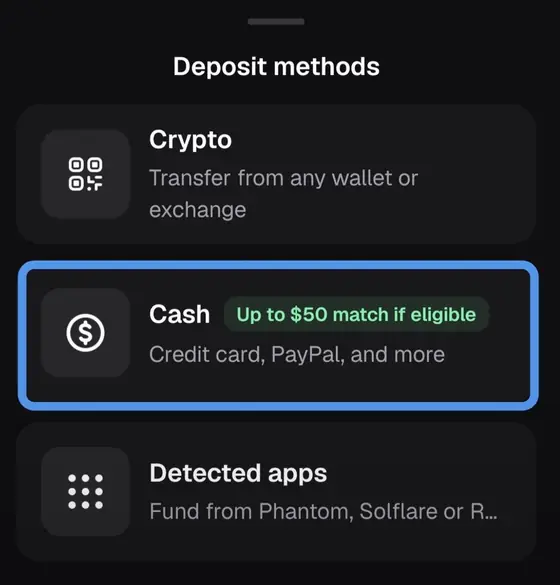
Read the green badge. It shows the match offer for your account, such as "Up to $50 match if eligible". The figure can differ between accounts and can change over time, and in November 2026 some new accounts saw "Up to $10". The badge in your own app is the offer that applies to you. If there is no badge at all, assume the purchase will not be matched.
Step 2: Pick how you pay
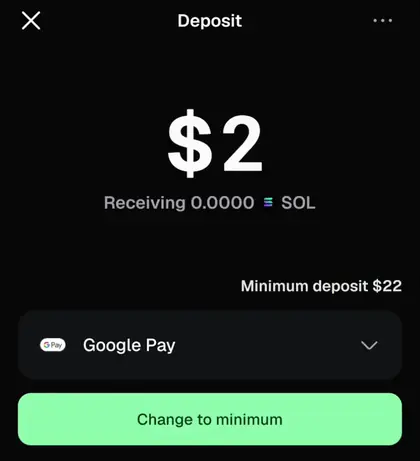
The Deposit screen shows a dollar amount, a Receiving line in SOL, the match line and a payment method row. Tap the payment method to open Select method.
On Android in November 2026 the list read Google Pay (marked Recommended), Debit Card, Venmo, PayPal and Revolut Pay. iPhones offer Apple Pay. What you see depends on your phone and your account, so pick whichever pays from an account in your name.
Step 3: Enter the amount and read the Receiving line
Type the amount or tap a quick amount such as $50 or $100. Go below the minimum and the screen says so and swaps the button for Change to minimum.
Above the minimum, the Receiving line turns into a quote: $22 bought 0.2424 SOL in this case. That figure already has the payment partner's fee taken out, so it is the honest number to judge the price by. Divide the dollars by the SOL you receive and compare the result with the SOL price on any exchange.
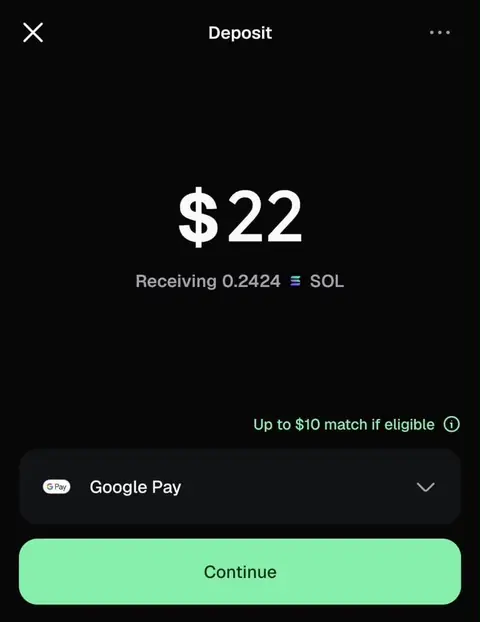
Card buys cost more than exchange buys. The partner charges a percentage, often several percent for cards and phone wallets, and small purchases can hit a minimum fee of a few dollars. Pump.fun's own 0.45% platform fee, or 0.40% with code BonusReward, comes later, when you trade. If you already hold crypto on an exchange, sending SOL costs less.
Step 4: Tap Continue and pass the checks
Tap Continue. The payment partner's checkout opens inside the app; at the time of writing it is MoonPay, and a "MoonPay transaction started" notice appears. The first purchase usually takes the most time:
- A verification code sent to your email.
- An identity check: a photo of your driving licence or passport, sometimes with proof of address.
- An order summary with the SOL amount and the total, then Pay with Apple Pay, Google Pay or your card.
When it works, a Deposit complete screen shows the amount, the SOL added, how you paid and a Deposit match row marked Pending if the purchase qualifies. The SOL is in your wallet and ready to trade. If you see "Purchase failed to process", try once more, then pick a different method. A bank declining a crypto purchase is the usual cause, and another card or Apple Pay often goes through.
Step 5: Trade on five different days
The match is paid as you trade, not when you deposit. Both you and the person whose code you used get the same amount, in the same installments. Under Pump.fun's referral terms of October 2026:
- The match equals your first purchase before the partner's fee, capped at $50 (or the offer your badge shows).
- It counts trading days by UTC date. Each day with at least one genuine trade earns an installment: a sixth of the match on each of the first four days and two sixths on the fifth. On $50 that is $8.33 four times, then $16.67.
- The five days must fall within 10 days of the deposit confirming. They do not have to be in a row.
- Each installment is credited in SOL or USDC after a review, with no promised timing, while the program budget lasts.
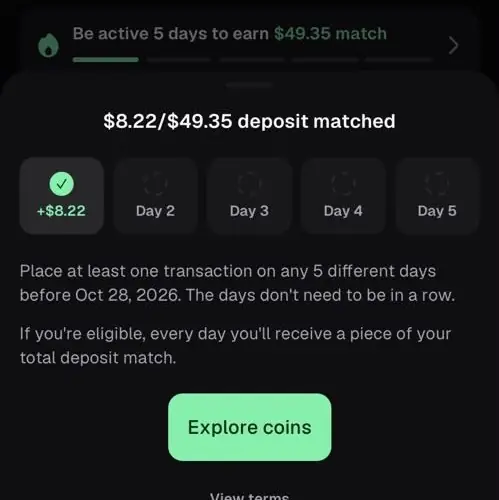
Leave the purchase in the wallet until the last installment lands. Withdrawing the crypto, or a refund or chargeback on the card, forfeits every installment not yet paid. Trading with it inside the app is fine.
The deposit match page covers the rest of the conditions, including what Pump.fun treats as abuse.
Can you buy a coin directly with Apple Pay?
Yes, on iPhones a coin page can offer Apple Pay as the payment for that coin. The screen reads "Acquiring" and the coin's name, with quick amounts from $50 to $500, an Order details drop-down and a fee line. That route runs through a different partner, Crossmint, whose terms you accept on the button.
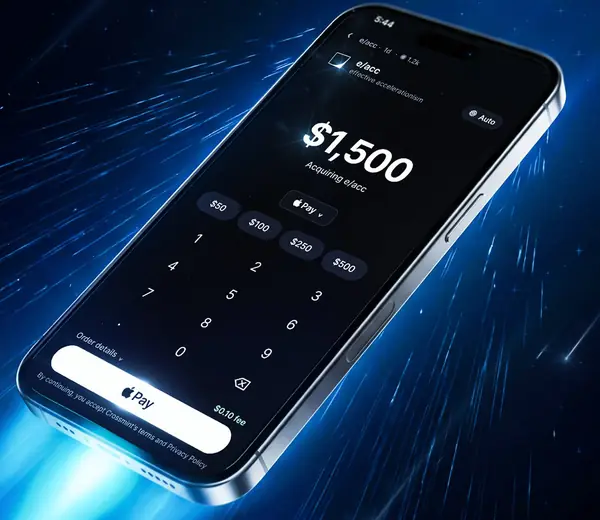
Pump.fun advertised Apple Pay buys of up to $1,500 from August to October 2026, at first "with no KYC". The same ads note that Apple Pay may still ask for identity or verification details. On coins you buy this way, expect the usual platform fee on top of the fee line, as on any trade. It can also count as your first purchase for the match, so apply the code before you use it.
The two-minute checklist
- Apply code BonusReward in the app before any purchase.
- Use a debit card or phone wallet in your own name.
- Check the badge on Cash for your match offer.
- Read the Receiving line before you tap Continue.
- Keep your ID handy for the first purchase.
- Trade on five separate UTC days within ten days. How to buy coins on Pump Fun covers the trade itself.
- Leave the purchased crypto in the app until the match is complete.
