
On this page
Before you start
You need the updated app, USDC for Predict and a stake you can lose. The Pump Fun Polymarket integration arrived in the Pumpfun mobile app on November 16, 2026, as a tab called Predict. You buy shares in an outcome, and each share pays $1 if you are right and nothing if you are wrong. Polymarket operates, settles and resolves the markets. The app is the screen you trade on.
- The current app version. Predict needs no second app and no second account. If the app is not on your phone yet, download the Pumpfun app and sign up first.
- An amount you can lose in full. Decide it before you open a market.
New to the app? Enter code BonusReward under Profile, Rewards, Referrals before your first purchase. It lowers the platform fee on coin trades from 0.45% to 0.40%, and the box locks after that first purchase.
Step 1: Update the app and open Predict
Update the Pumpfun app, then tap Predict in the top row of tabs. The row reads Coins, Perps, Predict, Packs, Stocks, so Predict sits between Perps and Packs.
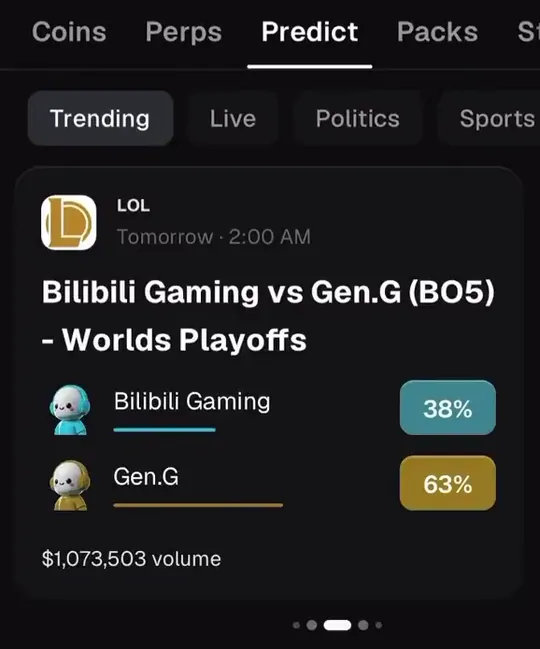
No tab? The app is most likely on an old version. Pump.fun announced Predict for the mobile app, so look there and not in a browser.
Step 2: Fund the Predict balance
Predict has its own USDC balance. Open your wallet in the app and find Other balances. It lists two rows, Perps and Predict, each with its USDC amount.
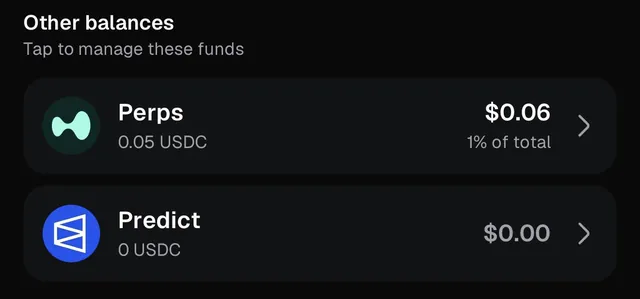
The line under the heading reads Tap to manage these funds. Tap the Predict row to do that. Do not treat the wallet as one pot: USDC parked under Perps for a long or short is not your Predict balance, and neither are your coins.
Step 3: Browse the categories and read a market card
Use the chips under the tabs to filter the markets. They read Trending, Live, Politics, Sports, Esports and Crypto. The markets cover sports and esports, world events, commodities such as gold, and crypto, including five-minute up or down markets.
A card shows the question, each outcome with its chance in percent, and the total volume. The card in the Step 1 screenshot is Bilibili Gaming vs Gen.G: 38% against 63%, on $1,073,503 of volume.
The percentage is the market price read as a chance, so 63% means a share costs about 63 cents. Liquidity can be thin, and low volume is a reason to trade smaller.
Step 4: Open the market and read the prices
Tap a card to open the market page. Each side has a button with its chance and its payout multiple: BLG 38% pays 2.67x, GEN 63% pays 1.60x.
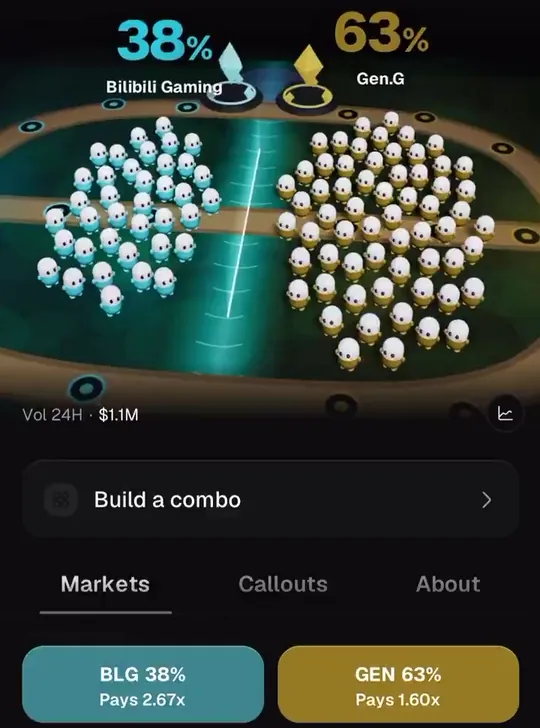
The multiple is what one dollar turns into if that side wins. The less likely side is cheaper and pays more: 38 cents a share for BLG, 63 cents for GEN.
Above the buttons sit the 24-hour volume, a Build a combo row, and three tabs: Markets, Callouts and About. Outcomes are resolved by third parties, not by Pump.fun, so check About for the market's details before you put money in.
Step 5: Pick a side and type an amount
Tap the button for the side you want. The buy screen opens with both sides at the top, now priced in cents (BLG 38¢, GEN 63¢), and yours highlighted. Tap the other one to switch.
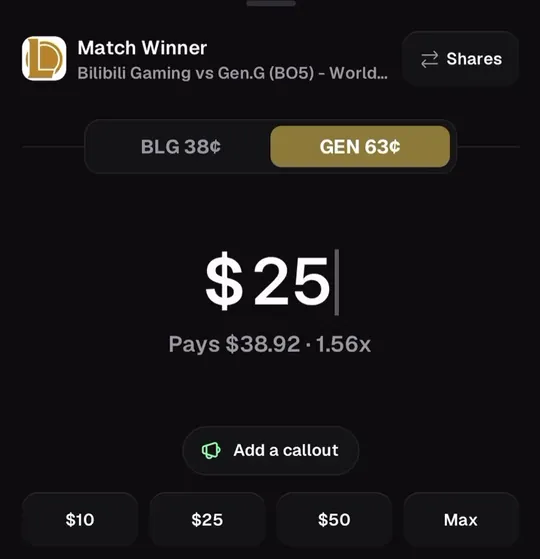
Type a dollar amount, or tap $10, $25, $50 or Max. The Shares button at the top right switches the entry from dollars to shares.
Check which side is highlighted before you type. Leave Max alone on a first order, because it puts everything available on one outcome.
Step 6: Read the payout line and Order details, then tap Buy
The line under your amount shows what you get back if you are right. With $25 on GEN at 63 cents it reads Pays $38.92 · 1.56x. That includes your $25, so the gain is $13.92.
The market page said 1.60x and this screen says 1.56x. Go by this line, which is worked out for your amount.
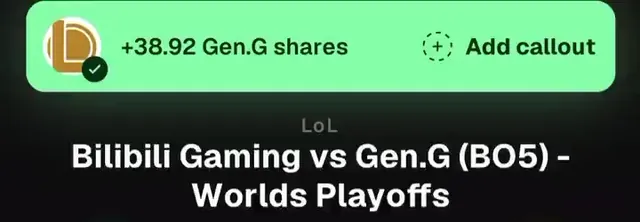
At the bottom, Available shows what you can spend, and Order details opens the breakdown, fee included. Open it before every order, then tap Buy once. The app confirms the shares you received, for example +38.92 Gen.G shares.
Step 7: Add a callout
Tap Add a callout on the buy screen to post your prediction. It needs an order of at least $1.25. With nothing typed, the button reads Buy $1.25+ to add a callout.
A callout is optional, and it is how Predict rewards you for trading. Callout Rewards have covered prediction markets since launch day. The money comes from two daily pots, Degen and Diamond, split between callers, so your share changes from day to day. Prediction callouts get a significant boost through the Diamond leaderboard, as perps callouts do. Post more than 10 callouts a week and more of your share moves to the Degen pot.
Skipped it? The banner that confirms your buy has an Add callout button, and the position card offers Add your callout after that.
Step 8: Read the Open position card
After the buy, the market page shows an Open position card with four numbers.
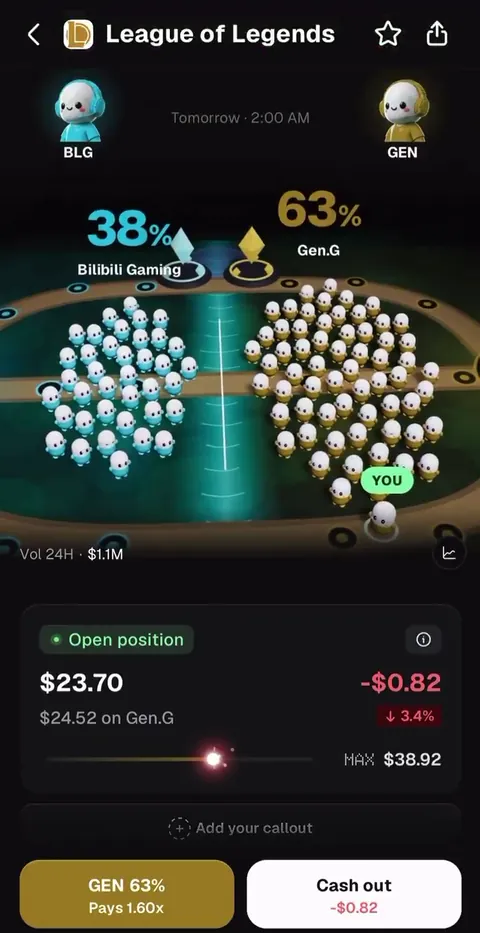
- The big number ($23.70) is what cashing out would pay at today's prices, after fees.
- The figure on the right (-$0.82, or 3.4%) is your profit or loss.
- The grey line ($24.52 on Gen.G) is the amount in and the side you hold.
- MAX ($38.92) is the payout if you are right.
A new position can show a small loss straight away, as this one does. The big number is a cash-out value, not what you paid.
Step 9: Cash out early or hold to the result
You have two exits. Cash out sells the position now, and the button shows the result before you tap: -$0.82 in the screenshot. That figure follows the market and can move fast, so read it again right before you tap.
Or hold until the market resolves. If your side wins, every share pays $1 and you receive the MAX figure. If it loses, the shares pay nothing.
A worked example with real numbers
Two real orders show how the price changes the bet.
| Order | Shares | Pays if right | Gain if right | If wrong |
|---|---|---|---|---|
| $25 on Gen.G at 63 cents | 38.92 | $38.92 | $13.92 | $0 |
| $19.86 on No at 99 cents | 20 | $20.00 | $0.14 | $0 |
The app explains the second one on the position card: "$19.86 is 20 shares. Each pays a dollar if it's No and nothing if not." So a 99% outcome risks $19.86 to gain 14 cents, and that same card listed $0.20 in fees paid, more than the gain on offer.
What it costs
Pump.fun has not published a fee schedule for Predict. One data point exists: a launch-day order of about $20 showed $0.20 in fees paid, roughly 1%. That is one order, not a rate.
Go by your own screen: the fee shows under Order details before you buy. In the $25 example, the position card read $24.52 on Gen.G, 48 cents under the order. A gap like that may come from fees, from the price you were filled at, or both.
The 0.45% platform fee, or 0.40% with code BonusReward, applies to coin trades. Pump.fun has not said that a referral code changes the cost of a prediction.
The risks
You can lose your entire stake on any prediction. A losing share pays zero, with nothing back at the end.
Prices can move fast, and a five-minute market leaves little time to react. Liquidity can be thin, so cashing out on a quiet market may return less than the card showed a moment earlier. Third parties resolve the outcomes, not Pump.fun, and the app is non-custodial: it never holds your funds.
The two-minute checklist
- Update the app and tap Predict, between Perps and Packs.
- Check the Predict row under Other balances.
- Read the card: chance and volume.
- Tap a side, check it is highlighted, type a small amount.
- Read the Pays line and open Order details for the fee.
- Add a callout if the order is $1.25 or more.
- Tap Buy once, then cash out or hold, knowing the shares can pay zero.
