
On this page
Before you start
Perps arrived in the Pumpfun app on October 28, 2026. You open the trade in the app, and Hyperliquid matches it, holds the margin and runs liquidations. A long makes money when the price rises. A short makes money when it falls. Leverage multiplies both directions.
Settle three things before you open anything:
- The most you can lose. On an isolated position, that is the margin you put in. Pick a sum you would be fine seeing go to zero today.
- Your leverage. 2x or 3x for the first trades. You can raise it once you have watched a position move for a few days.
- Where you are wrong. A price that proves the idea wrong becomes your stop loss. Without one, the liquidation price decides for you.
If you have not opened the app yet, add a referral code such as BonusReward under Profile, Rewards, Referrals before your first purchase. It lowers Pump.fun's perps fee from 0.05% to 0.04% of each order.
Step 1: Fund the wallet
Perps margin comes from the USDC or SOL already in your Pumpfun wallet, with no manual bridging. If the wallet is empty, deposit first with Apple Pay, a card or a transfer.
The first order adds two one-time steps. The app asks you to approve Pump.fun's builder fee with a signature, and Hyperliquid takes a small account activation fee from your first deposit. After that, each move of funds to or from Hyperliquid can carry a Pump.fun fee of up to 0.25%, on top of the bridge operator's own fee. Move money in once rather than in small top-ups. Hyperliquid's smallest order is about $10 of position size, so a few dollars of margin with leverage is enough to test the flow.
Step 2: Pick a market
Open the Perps tab in the app's coin lists. The filters at the top are All, Crypto, Stocks and Commodities, and more than 300 Hyperliquid markets sit behind them.
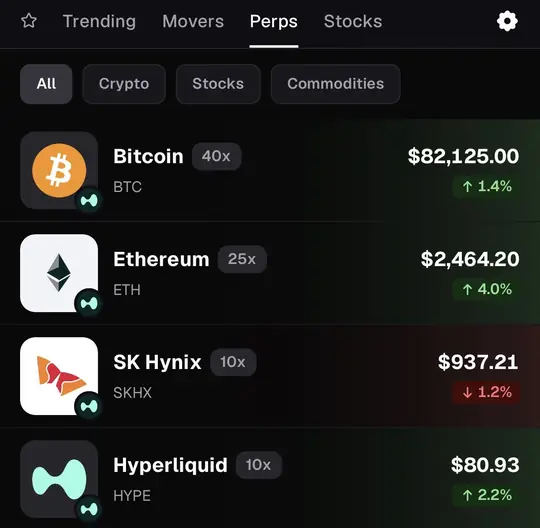
The badge next to each name is the market's top leverage: 40x on Bitcoin, 25x on Ethereum, 20x on majors such as SOL, 10x on smaller markets such as HYPE or PUMP. Read it even if you never plan to use it. A low cap marks a volatile market. As Step 6 shows, it also pulls your liquidation price closer.
Step 3: Choose Long or Short
Tap the market to open its chart, then tap Long if you expect the price to rise or Short if you expect it to fall. Shorting works exactly like a long in reverse: same screens, same fees, and you profit as the price drops.
Orders open at the market price. At the time of writing, perps in the app have no limit entry, only take profit and stop loss exits. If you want a better entry, wait for it, then tap.
Step 4: Set the amount and leverage
Type your amount, which is your margin, then drag the leverage slider. The line under the amount shows the full position size.
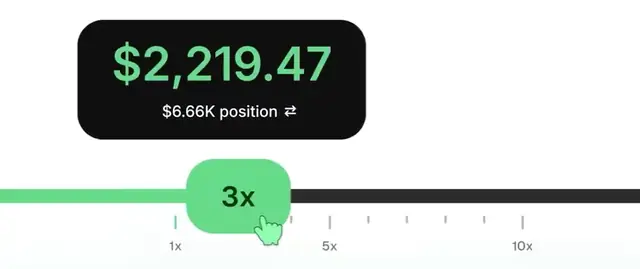
Position size is margin times leverage. $100 at 5x is a $500 position, and every 1% move in the price is 5% of your margin. The arrows next to the position line swap the two figures, and the position card later does the same, so check which label you are reading before you act.
Check the slider on every order, even a repeat trade. One stray drag turns 3x into 20x.
Step 5: Add a take profit and stop loss
Set both as you open the position, or tap Add TP/SL on the position card right after. Do it now, while you are calm about the trade.
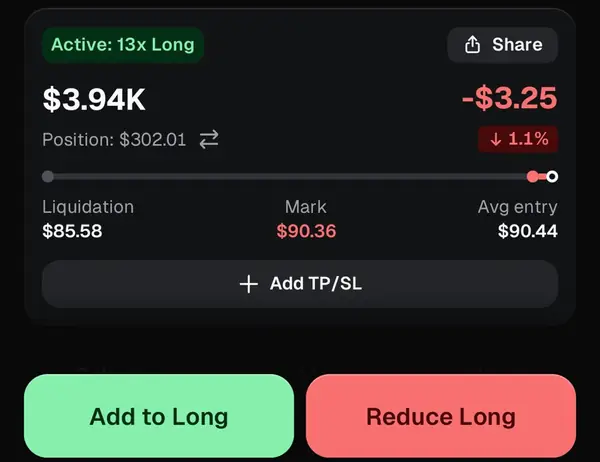
Put the stop loss well before the liquidation price. On the card above, the long entered at $90.44 and liquidates at $85.58. A stop at $87.50 caps the loss at about 3% of the price, roughly 40% of the margin at 13x, and leaves a buffer before liquidation. Both orders are triggers, and in a fast market they can fill worse than the level you typed.
Read the fee line before you confirm. Pump.fun shows its builder fee as a separate line on every order.
Step 6: Watch the position and close it
Your open position shows on the market's chart, with a blue Avg line at your entry and a dashed red Liq line at your liquidation price.
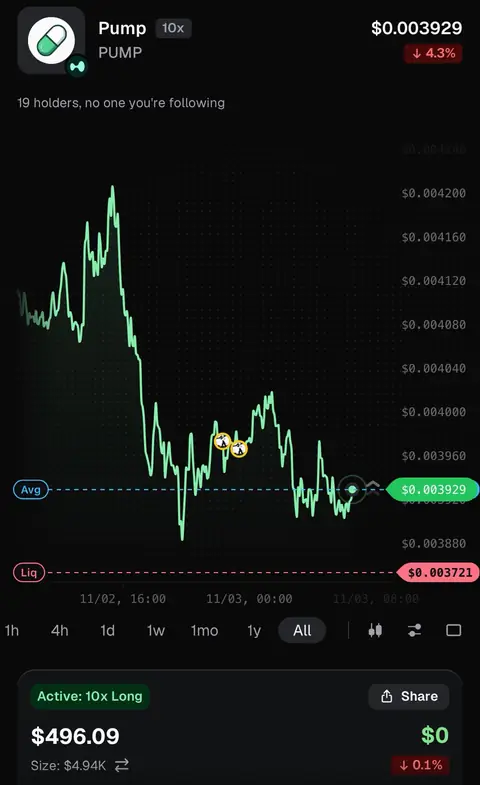
Compare the two positions in this guide. The 13x SOL long liquidates 5.4% below entry. The 10x PUMP long liquidates 5.3% below, about as close, at lower leverage. The reason is the market's cap: a position must keep a minimum margin, which on Hyperliquid is half of what the market needs at its top leverage. That is 2.5% for SOL at 20x, but 5% for PUMP at 10x. For a quick estimate, divide 100 by your leverage, then subtract that minimum.
To close, tap Reduce Long or Reduce Short and take off the whole position. Take off part of it to bank some profit. Add to Long or Add to Short makes the position bigger and moves your average entry. Funding is paid or received every hour while the position stays open, so a perp held for weeks costs more than the trading fees suggest.
Liquidation comes without a warning. When losses eat the margin down to that minimum, Hyperliquid closes the position and the margin is gone. A short spike can do it even if the price comes back an hour later. Our Pump Fun perps page covers liquidation, funding and margin modes in depth.
What a round trip costs
Pump.fun charges a builder fee of up to 0.05% of the position size on each order that opens, adds to or closes a position, or 0.04% with code BonusReward. The 0.45% platform fee on token trades does not apply to perps. Hyperliquid's own fee comes on top, 0.045% at its base tier for orders that fill right away.
| $100 of margin, opened and closed | No code | With a code |
|---|---|---|
| At 5x ($500 position) | $0.95 | $0.85 |
| At 20x ($2,000 position) | $3.80 | $3.40 |
Fees are charged on the position, not the margin. At 20x, one round trip takes 3.4% to 3.8% of your margin before funding.
The two-minute checklist
- Decide the margin you can lose in full, and your exit price.
- Fund once with USDC or SOL; approve the builder fee on the first order.
- Open the Perps tab and read the market's leverage badge.
- Tap Long or Short, type the margin, check the slider.
- Check the position size and the liquidation price.
- Add a take profit and a stop loss well before liquidation.
- Close with Reduce, all of it, and cancel leftover orders if any remain.
