
On this page
Before you start
Pick the tool first. Terminal, Pump.fun's desktop trading platform at trade.padre.gg, tracks any address on Solana and the EVM chains it supports. The Pumpfun app does not track raw addresses. It follows people, so a wallet that has never used Pump.fun has no profile to follow there.
Tracking is free and needs no funds in Terminal. You only need to be signed in. Decide what the tracking is for. To learn how a trader picks coins, alerts and highlights are enough. To buy when they buy, read our copy trading guide as well, because quick-buy sizes and delay need their own settings.
Step 1: Find the wallet address
Copy the address from a screen you trust, never from a reply. Screenshots are no better. Lookalike addresses that share the first and last characters are cheap to make.
- From a coin. On a token page in Terminal, the Holders, Top Traders and Early Buyers tabs list the wallets behind it. Early Buyers, added on October 27, 2026, shows the first 50 buyers in order. Click any maker to open its wallet overview.
- From a person. Every Pump profile is public. On pump.fun, the Wallets row of a profile opens the trader's wallets.
- From a search. Since October 26, 2026, the Portfolio search in Terminal takes any address, or the name of a known trader, and shows its performance read-only.
- From a list. The KOLs Manager tab on Terminal's Track page holds wallets of known influencers. You can show or hide their trades on charts.
Step 2: Add it to Terminal's Wallet Manager
Open Track in the top menu, then the Wallet Manager tab. A group called Default, marked with a star, is already there.
- Click Add wallet at the bottom right.
- Paste the address and fill in Wallet Name. A short label such as "fast dev" or "4h holder" helps more than a nickname.
- Pick a Highlight color if you want this wallet to stand out, then save.
Use + Group to split wallets by job: creators, whales, friends. Each group has its own alert settings, including the smallest trade in USD that earns a chart marker. Every row carries small switches for alerts, chart markers, the Live Trades feed and transfers, plus a bin to remove it. When the Add wallet button greys out with "Reached wallets limit", the group is full.
Two shortcuts save time. Since November 6, 2026, naming an untracked wallet in its overview or in the Holders table adds it to a group automatically. And the Custom Wallets tab, added on October 28, 2026, lets you name or color a wallet without tracking it. That suits wallets you want to recognize but never hear from.
Step 3: Import a whole list at once
Paste a list into Import, at the bottom left of the Wallet Manager. The Import Wallet Group box accepts JSON or CSV with one wallet per line: the address, then a comma and a label.
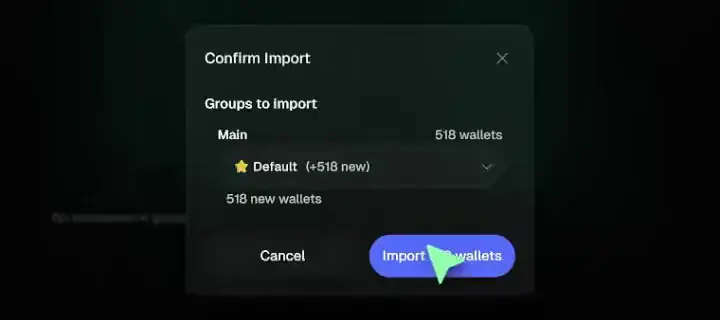
Next comes Confirm Import. It lists each group in the file, how many wallets it holds and which of your groups receives them. Click the import button and a message confirms the count. To move a list the other way, the export option copies the current group's wallets to your clipboard.
The usual mistake is importing a list of hundreds of "alpha wallets" bought from a group chat. Many are dead, some are bots, and every one of them can ping you. Start with 20 wallets you have checked.
Step 4: Turn on alerts
Open the gear for Settings, then Notifications, then Wallet Tracker. Switch on Enable wallet tracker notifications and pick a sound and how long each pop-up stays. Cmd+K or Ctrl+K finds any setting by name.
- Transfers have their own switch and, since October 20, 2026, a minimum USD value. Set $50 or so and dust stops beeping.
- Max toasts on screen caps the pile at anything from 1 to 10.
- Each pop-up has a quick buy button. Its amount is set per chain, and 0 hides it. Set 0 if you track to learn, so a stray click never buys.
Keep a tab open. Terminal's wallet alerts are pop-ups inside the page, so in most setups they only reach you while Terminal is open in a browser tab.
Step 5: Highlight tracked wallets on charts and Trenches
Highlights show a tracked wallet without any sound. In a wallet's overview, click the paint bucket and tick Highlight, then Custom color to give it its own shade.
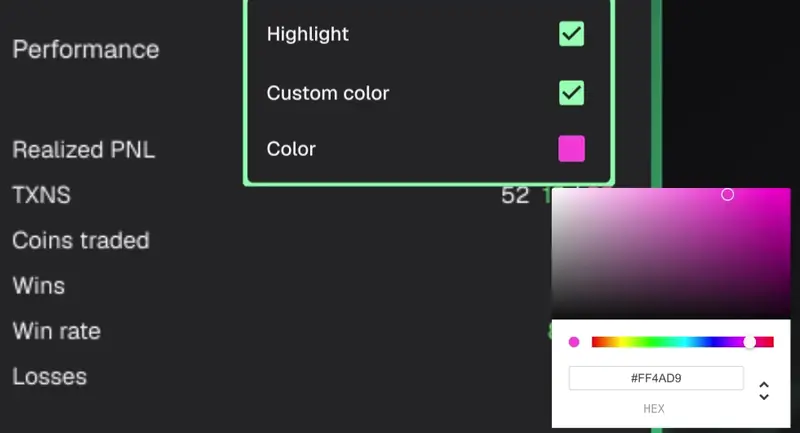
Its rows in every trades table then get a tint, gold unless you choose another color. Since October 28, 2026 you can pick Full or a thinner Border style. On a coin's Trades tab you can also type a tracked wallet's name into the maker filter and see only its trades.
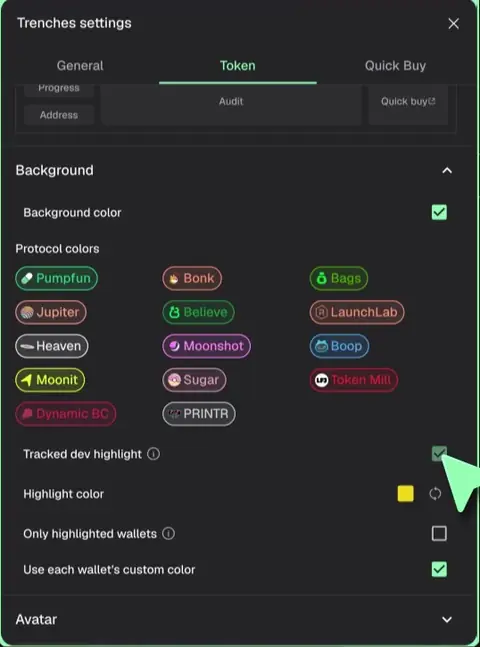
For creators you follow, open Trenches settings, then the Token tab, and switch on Tracked dev highlight. Any new coin launched by a tracked wallet then lights up in Trenches. Tick Only highlighted wallets to limit it to the creators you marked with Highlight.
Step 6: Follow the trader in the Pumpfun app
On your phone, follow the profile instead of the address. Open it from search, the feed or the leaderboard and tap Follow.
Then choose which of their moves reach you. The Positions switch in the app's alert settings sends an alert when someone you follow changes a position, above a minimum size in USD you set. Pump.fun promoted these trade alerts for one of its best-known traders on November 2, 2026. The full setup, phone settings included, is in our guide to app alerts.
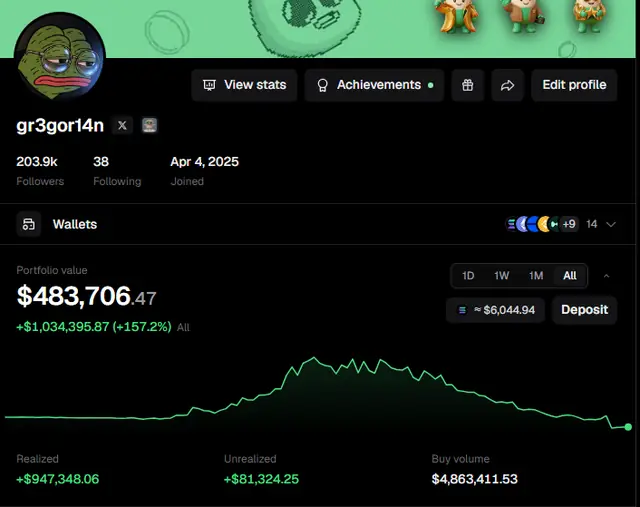
App alerts only cover the wallets on that profile. A trader's buys from other wallets or other platforms never show up.
How do you judge a wallet before tracking it?
Look at how the wallet makes its money before you look at the total. Five checks catch most bad picks.
- Sample size. In the wallet's Performance panel, switch to 30d. Thirteen coins at an 85% win rate could be one lucky week.
- Realized versus unrealized. Realized is cashed out. A profile showing mostly unrealized gains is a paper result.
- Speed. If the wallet sits near the top of Early Buyers on coin after coin, it is a sniper. By the time your alert arrives, its edge is gone.
- Funding. The Holders tab labels wallets funded at the same time, often one person. Since October 8, 2026, Terminal also shows Arkham labels, so exchange wallets and known entities are easy to spot.
- Transfers. Tokens moved in for free make profit look bigger than the trading behind it.
The copy trading guide has the longer checklist and the numbers behind delay. Our view: 20 wallets you understand beat 500 you imported.
If it does not work
Check these in order.
- No pop-ups. Check Wallet Tracker notifications in Settings, then the wallet's own alert switch, then the group's alert settings. A muted browser tab also stays silent.
- No marker on the chart. The wallet's chart switch is off, or the group's minimum marker value is higher than the trade.
- Add wallet is greyed out. The group is full. Remove dead wallets or start a new group.
- Import says it cannot import. Put one address per line, with a comma before any label and no extra spaces. Keep Solana and EVM addresses in separate lists.
- The app follows but never alerts. The Positions switch is off, the minimum size is too high, or the phone blocks the app's notifications.
